
Woodpecker Wireless i-Scan Imaging Plate Scanner | JMU Dental Supply Skip to content
Free shipping for orders over $9.99 (Heavy items - freight charges separate)

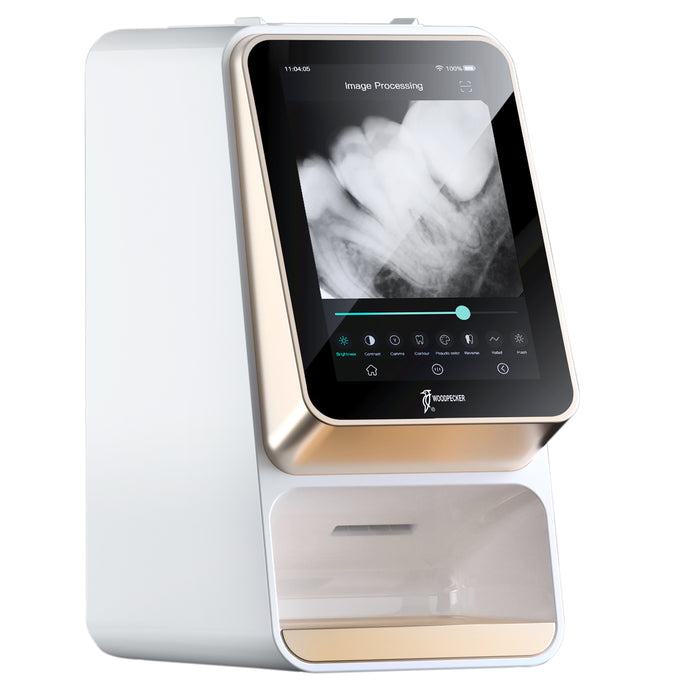
Woodpecker i-Scan Wireless PSP Imaging Plate Scanner W/ Free Software

Availability:
Out of stock
Availability:
Out of stock
SKU 10211001
Original price
Original price
$2,999.99
$2,999.99
Current price $2,999.99
Quantity: 1 Set

Enjoy free shipping on most items over $9.99.

Ships from California. Delivered in 1–5 business days.

Accept 30-day return or refund.

Woodpecker Dental i-Scan Wireless PSP Imaging Plate Scanner with Free Software, 7" Ultra High Resolution Touch Screen, 25um Advanced Micro-spot Laser Scanning Technology, Ultra Clear and Smoother Image, More Reliable Diagnosis Basis, 0.4mm Ultra-thin Imaging Plates (1x S0,1x S1, 2x S2), Can be Used Over 1000 Times. Softer than Conventional Films, One Year Warranty. 

Note: The Woodpecker i-Scan is optimized for use with Woodpecker AI-Dental software. It includes a TWAIN driver for third-party integration, but certain functions may be limited or unavailable when used with non-Woodpecker software.

Features

  • Free AI-Dental Image Management Software: Features TWAIN driver compatibility, seamlessly integrate into your existing clinical software suite—including popular tools like EagleSoft, OpenDental, Dexis, Tab32, Ortho2, CareStream, and Dentrix.
  • Standalone "Chair-Side" Mode: Allows dentists to insert, scan, and view the X-ray results immediately on the 7-inch touchscreen without waiting for a computer terminal to fetch the data.
  • Wireless Connectivity: Supports 5G and Wi-Fi networks. Scanned images can be instantly transmitted to external devices like iPads, smartphones, laptops, or central workstations
  • Ultra-Thin Plates: Comes with reusable, flexible imaging plates (typically 4 plates included: 1x S0, 1x S1, 2x S2) that are thinner and softer than traditional dental film, optimizing patient comfort
  • AI Image Optimization: Features a "One-Click Ultra-Clear Algorithm" that enhances fine details and reduces background image noise.
  • Plate Compatibility: Supports four standard phosphor plate sizes (Size 0, 1, 2, and 3)

    Intended Use

    • This PSP I-Scan scanner can convert the image information stored on the IP board into digital X-ray dental film, and display and edit it through the host screen or computer.
    • Equipped with image management software can achieve image acquisition, information management and other functions.
    • Specially designed for professional medical personnel and can only be used by qualified and fully trained medical personnel.
    • Suitable to scan the latent image information of IP imaging plate to form intraoral dental digital X-ray image, and to browse, process and consult the image.

      Technical Parameter

      Screen Display 7", one-touch operation
      CPU Powerful 8 core for a clearer, smoother image
      Resolution Ultra-high
      IP Imaging Plate Model 0; 1; 2; 3
      Power Adapter Output DC 15V 3.2A
      Power Input 100-240V 50/60Hz,1.1A
      Threshold Contrast 4 holes of 1.0 mm, 1.5 mm, 2.0 mm and 2.5 mm can all be distinguished
      Image Uniformity <2%
      Max Output of Laser Radiation 28mW
      Emitted Wavelength(s) 651-665nm
      Effective Imaging Area Maximum dimensions (mm)
      Size 0.4mm plates, softer than conventional films
      Weight 4.5kg


      0-3 Plate Size

      Model X-direction Y-direction
      #0 21 32
      #1 23 39
      #2 30 40
      #3 26 53

        Scanning Speed Mode

        Scan mode  Scan time
        Fast scan 7
        Hige-precision scan 10
        Ultra-hige precision scan 15

          Packing List

          • Main i Scan Unit *1
          • Power adapter *1
          • IP Imaging Plate #0 *1
          • IP Imaging Plate #1 *1
          • IP Imaging Plate #2 *2
          • Protective Barrier Envelope #0 *1
          • Protective Barrier Envelope #1 *1
          • Protective Barrier Envelope #2 *2
          • Protective Card for IP Imaging Plate #0 *1
          • Protective Card for IP Imaging Plate #1 *1
          • Protective Card for IP Imaging Plate #2 *2
          • Storage boxof IP imaging plate *1
          • U Disk *
          • Cleaning cloth *2
          • Tips for using *1
          • Quick installation guide *1
          • Instruction Manual *1
          • Warranty Card *1
          • Qualified certificate *1
          • Packing list *1

            Warranty

            One year free repair for the whole unit from the date of purchase. 

            How to use the Woodpecker i-Scan

            1. Take out a bite protector, and select one PSP plate such as the plate size 2.
            2. Place the plate inside the bite protector following the orientation on protector.
            3. Then put inside the hygienic cover, remove the paper from the sticker and seal well.
            4. Once radiography is complete, press SCAN button, remove the protective sticker, and insert the plate into the i-scan using the bite protector for guidance.
            5. The plate will then be scanned and erased and ready for the next use.
            (Pro Tips: The i-scan remains active for additional plates and offers built-in image tools. Images are simultaneously transmitted to your PC.)

            Customer Reviews

            Be the first to write a review
            0%
            (0)
            0%
            (0)
            0%
            (0)
            0%
            (0)
            0%
            (0)