
Woodpecker EndoMatic Cordless Endo Motor w/ Apex Locator | JMU Dental Skip to content
Free Shipping for Orders over $9.99 (Heavy Items Excluded)

Woodpecker EndoMatic Cordless Endo Motor w/ Integrated Apex Locator 2 in 1 Endo System

Availability:
Low stock
Availability:
Out of stock
SKU 10202004
Original price
Original price
$699.99
$699.99
Current price $699.99
Quantity: 1 Set

Free Shipping over $9.99, 1-5 Days for Delivery.

Accept 30-Day Return or Refund.

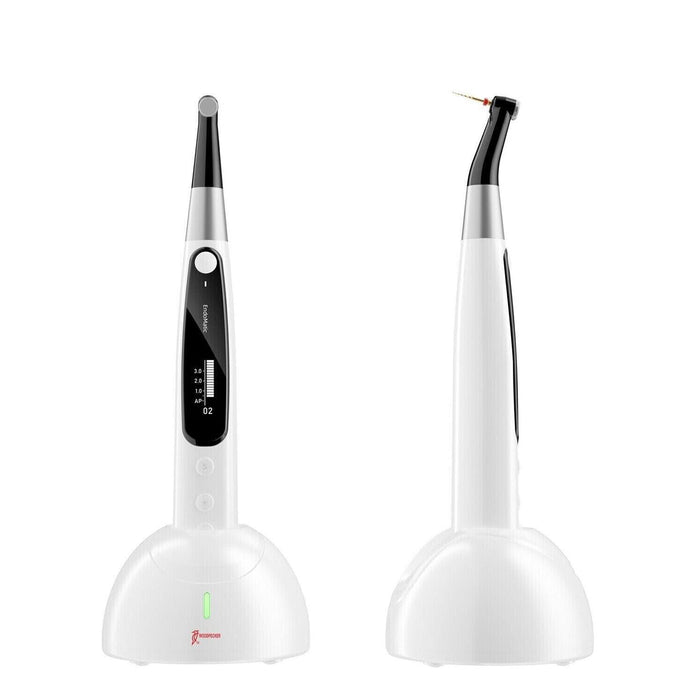
Woodpecker EndoMatic Cordless Endo Motor with Integrated Apex Locator & All-Angle OLED Screen

The Woodpecker EndoMatic Cordless Endo Motor with Integrated Apex Locator combines precision rotary instrumentation and real-time working length measurement in one compact device. Designed as a complete 2-in-1 endodontic system, the FDA-approved Woodpecker EndoMatic endomotor features intelligent apical control, automatic start/stop, a 300° rotating contra-angle, and compatibility with more than 20 mainstream NiTi file systems. Its ergonomic cordless design and aviation-grade insulated contra-angle make daily root canal treatment more efficient, accurate, and comfortable.

⚠️ Important Notice: The model supports SGP (Safety Glide Path) in the endodontic system, which corresponds to the traditional REC (Reciprocating Motion) mode.

Features

  • 300° Rotating Contra-AngleThe contra-angle features a 300° rotation, allowing for easy visibility of the OLED display at all times. The motor supports adjustable reciprocating angles for precise endodontic performance. 
  • Integrated Apex Locator for Real-Time Working Length: The Woodpecker EndoMatic endo motors with apex locators continuously monitor file position during instrumentation. As the file approaches the apical region, the motor automatically slows down and can stop or reverse to improve safety and reduce the risk of over-instrumentation.
  • Auto Start, Stop, Reverse, and Apical Slow-Down: In integrated mode, the motor starts automatically when the file enters the canal and stops when it is removed. As the file approaches the apical point, it slows down automatically and will reverse or stop when the apex is reached, helping minimize file separation and improve workflow efficiency.
  • Aviation-Grade Insulated Plastic Contra-Angle: The contra-angle of the Woodpecker endo motor is user-friendly and autoclavable. Its insulated surface allows the endo motor and apex locator to be used together without the need for a silicone sleeve for insulation.
  • All-Angle OLED Display: The high-contrast OLED screen provides clear visibility from virtually any viewing angle, allowing clinicians to monitor speed, torque, working length, and operating mode even under bright operatory lighting.
  • Compatible with Major File Systems: The Woodpecker EndoMatic includes over 20 built-in file systems and offers adjustable speed and torque settings for compatibility with leading NiTi systems, including FKG, Dentsply, EdgeEndo, Vakker, and many others.

Specifications

Power Input ~100V–240V, 50Hz/60Hz, 0.4A Max
Handpiece Lithium Battery 3.7V, 2000mAh
Power Output DC 15V / 1A 
Speed Range 100 rpm – 1000 rpm
Torque Range 0.4 Ncm – 5.0 Ncm (4 mNm – 50 mNm)
JMU Model Number (SKU) 10202004

Packing List

  • Charging Base × 1
  • Motor Handpiece × 1
  • Contra Angle × 1
  • Spray Nozzle × 1
  • Measuring Wire × 1
  • File Clip × 1
  • Lip Hook × 1
  • Touch Probe × 1
  • Disposable Insulation Sleeves × 1
  • Adapter × 1
  • Built-in Electrode × 1
  • Instruction Manual × 1
  • Qualified Certificate × 1 
  • Warranty Card × 1
  • Apex Locator Troubleshooting Card × 1
  • Packing List × 1

Warranty

One-Year Warranty

1. Why doesn't the motor handpiece rotate?
If the motor does not rotate, it may be because EAL mode is selected, which is used only for working length measurement. Switch to CW, CCW, REC/SGP, or ATR mode before starting the procedure.
2. Why does the motor handpiece keep beeping after startup?
A continuous beep indicates that the motor is currently set to CCW (counterclockwise) mode. Stop the motor and switch to CW mode before resuming operation.
3. Why is there no sound from the motor?
The beeper volume may be set to Mute (Volume 0). Increase the beeper volume to Level 1, 2, or 3 in the settings menu to restore audible notifications.
4. Why does the rotary file become stuck in the root canal?
A rotary file may become lodged because of incorrect operating parameters or excessive load on the file. Switch the motor to CCW (counterclockwise) mode and carefully remove the file before continuing treatment.

Customer Reviews

Based on 1 review
100%
(1)
0%
(0)
0%
(0)
0%
(0)
0%
(0)
N
Ninive Quiros

Holaaa mi paquete aún no ha llegado la entrega que realizaron fue el día 7 de noviembre y no han pasado ni siquiera 14 días. Que clase de servicio ofrecen ustedes indicando mentiras en fechas de entrega exijo explicación al respecto sino me devuelven mi dinero porque mi paquete aún no me ha llegado a mis manos